

In a modern CI/CD pipeline, automating job triggers when changes are detected in a code repository is essential to streamline workflows. One of the easiest ways to achieve this in Jenkins is through the polling technique, where Jenkins regularly checks the repository for updates and triggers the job if it detects any changes.
This post will provide a comprehensive, hands-on guide to configure repository polling in Jenkins for automated job execution. We'll walk through setup, explain how polling works, discuss its pros and cons, and troubleshoot common issues.
1. Prerequisites
Before diving in, ensure you have the following ready:
- Jenkins installed and running: Refer to my Jenkins installation guide.
- Git installed on the Jenkins server: Git is required to interact with the repository.
- A job configured in Jenkins: You can start with a basic Freestyle or Pipeline job.
- Access to a Git repository: Use a repository hosted on GitHub, GitLab, Bitbucket, or your self-hosted Git server.
If you need help creating a repository or Jenkins job, check out these guides:
2. Understanding Polling in Jenkins
Polling is a technique where Jenkins periodically checks a repository for changes by comparing its current state to the last known state. If changes are detected (e.g., a new commit or branch update), Jenkins will trigger the corresponding job.
How Polling Works:
- Jenkins fetches metadata (like commit history) from the repository.
- It compares the latest commit ID with the previously recorded one.
- If a difference is detected, Jenkins triggers the job.
Unlike webhooks, where the repository actively notifies Jenkins about changes, polling is a passive process where Jenkins takes the initiative to check for updates.
3. Setting Up a Jenkins Job to Trigger via Polling
Step 1: Access the Jenkins Job Configuration
- Log in to your Jenkins instance.
- Navigate to the job you want to configure for polling.
- Click Configure on the left-hand sidebar.
Step 2: Set Up Source Code Management (SCM)
- In the job configuration page, scroll down to the Source Code Management section.
- Select Git (or your preferred SCM system).
- Enter the Repository URL (e.g.,
https://github.com/your-repo.git). - Add credentials if the repository is private.
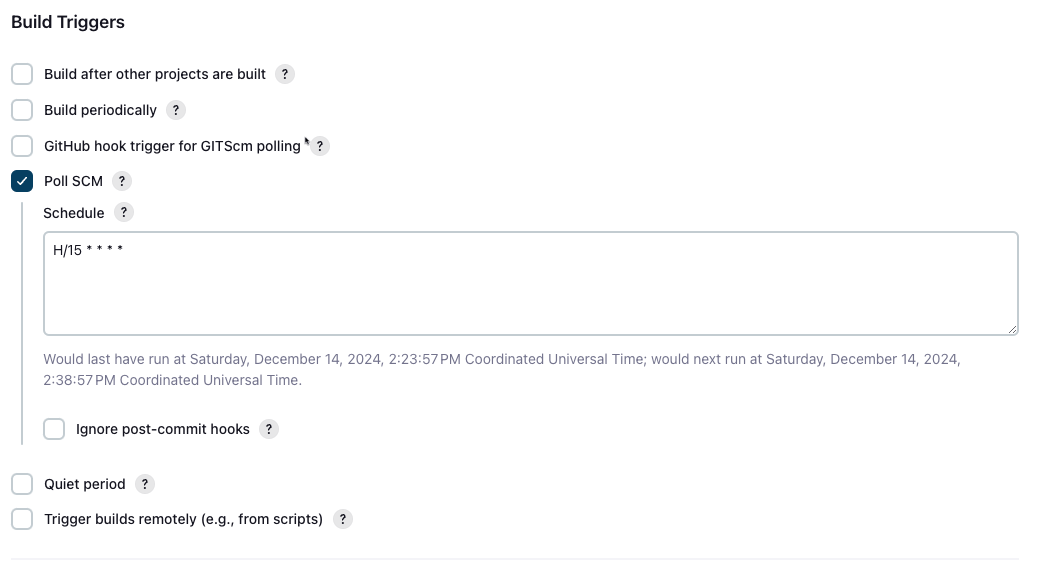
Step 3: Configure Poll SCM
- Scroll down to the Build Triggers section.
- Check the box Poll SCM.
- In the Schedule field, define the polling interval using a cron-like syntax.
Example Schedule Syntax:
| Syntax | Explanation |
|---|---|
* * * * * |
Poll every minute |
H/5 * * * * |
Poll every 5 minutes (recommended) |
H/15 * * * * |
Poll every 15 minutes |
H 9 * * 1-5 |
Poll at 9:00 AM on weekdays |
Best Practice: Avoid polling too frequently (e.g., every minute), as it can overload the Jenkins server and repository.
Step 4: Save and Test
- Click Save or Apply to save the job configuration.
- Trigger the job manually once to ensure the repository is correctly fetched.
- Make a commit to the repository and wait for Jenkins to poll the changes.
If configured correctly, Jenkins will detect the update and trigger the job.
4. Configuring Poll SCM in Freestyle Jobs
Freestyle jobs are the simplest type of Jenkins jobs. Here's how to set up polling for them:
- Go to Configure for the Freestyle job.
- Under Source Code Management, select Git and provide the repository URL.
- In the Build Triggers section, enable Poll SCM.
- Enter a polling schedule (e.g.,
H/5 * * * *). - Add a Build Step (e.g., Execute Shell) to perform actions like building the code.
#!/bin/bash
# Example shell script
echo "Building the project..."
make build
- Save the configuration and test as described earlier.
5. Configuring Poll SCM in Pipeline Jobs
Pipeline jobs use code to define the build process. You can set up polling directly in your Jenkinsfile.
Example Declarative Pipeline with Polling:
pipeline {
    agent any
    triggers {
        pollSCM('H/15 * * * *')
    }
    stages {
        stage('Checkout Code') {
            steps {
                git branch: 'main', url: 'https://github.com/your-repo.git'
            }
        }
        stage('Build') {
            steps {
                sh 'echo Building the project...'
            }
        }
    }
}
Key Points:
- The
triggersblock defines polling frequency. - The
gitstep fetches the code from the specified repository. - Stages like
Buildallow you to define actions to execute.
Save this code in a Jenkinsfile and push it to your repository.
6. Common Issues with Polling and How to Fix Them
6.1 Jenkins Is Not Polling the Repository
- Check SCM Configuration: Ensure the repository URL is correct and credentials are valid.
- Polling Schedule: Verify that the cron syntax is accurate.
Git Installation: Ensure Git is installed on the Jenkins server.
git --version
6.2 Frequent Polling Causes High Load
- Use H/5 or H/15 to distribute polling intervals.
- Switch to webhooks for a more efficient triggering mechanism.
6.3 Jenkins Job Does Not Trigger
- Check the job logs for errors related to SCM polling.
- Verify that Jenkins has permission to access the repository.
- Ensure there are actual changes in the repository to trigger the job.
7. Pros and Cons of Using Polling
Pros:
- Easy to set up with no external configurations.
- Works with most SCM systems.
- Reliable for detecting changes.
Cons:
- Can cause high server and network load if configured too frequently.
- Less efficient than webhooks for immediate triggers.
Conclusion
In this guide, we explored how to trigger Jenkins jobs using repository polling. By configuring the Poll SCM feature, Jenkins periodically checks for changes in the repository and triggers jobs when updates are detected. This method is simple and effective, especially for smaller projects.
While polling is a great starting point, consider using webhooks for more efficient real-time notifications as your CI/CD pipeline grows.
Next Steps
- Experiment with polling schedules to optimize performance.
- Learn how to set up webhooks for instant job triggers (coming in a future post).